
What a waiver is
A waiver is a short liability-release agreement between you and the organizer. Hands-on workshops — think knife skills, climbing, pottery kilns, open water — often carry some real-world risk, so the organizer asks you to acknowledge it before you join in. Not every workshop has one; it’s up to the organizer.
Wayfield offers organizers a standard waiver (a clear, plain-language template) or lets them upload their own document. Either way, you’ll see the exact text before you agree to anything.
When you’ll see it
There are two moments a waiver can appear, and the organizer chooses which:
- Before you pay — the waiver shows up during checkout and the Pay button stays off until you’ve signed. You can read and sign it right there in the checkout flow.
- After you join — you can register first, and the waiver waits for you on your workshop in My Workshops. Until it’s signed, it sits in front of the workshop’s materials and check-in.
How to sign it
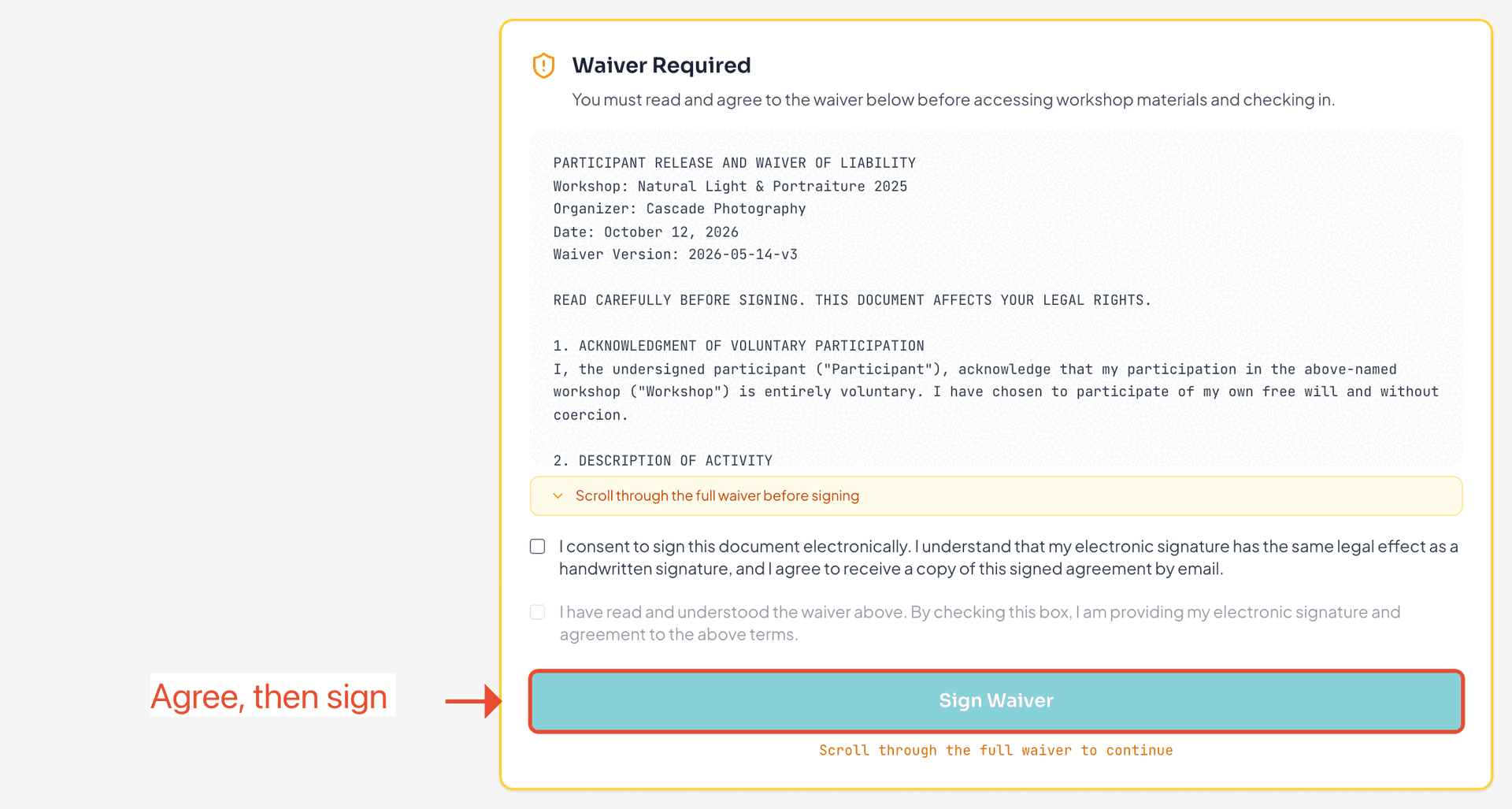
Signing is three quick steps, in order:
- Read it. Scroll through the whole waiver — the Sign button stays locked until you reach the end, so you can’t miss anything.
- Consent to signing electronically. Check the box confirming your e-signature counts the same as a handwritten one (and that you’d like a copy emailed to you).
- Agree and sign. Check the agreement box and tap Sign Waiver. Your signature, the date, and your IP address are recorded as your legal acknowledgment.
What signing unlocks
Once you’ve signed, the gate disappears and you get on with the workshop. Depending on when the waiver appeared, signing is what lets you complete your payment, or open the workshop’s materials and check in on the day. Until it’s signed, those stay locked — not to be difficult, but because the organizer needs it on file first.
You sign once per workshop
A waiver is tied to the workshop, not to each session. Sign it once and you’re done for that whole workshop — you won’t be asked again every time you show up. Wayfield keeps a snapshot of the exact wording you agreed to, with the date and time.
Your signed copy
Right after you sign, Wayfield emails you a copy of the signed agreement for your records. Keep that email — it’s your proof of what you agreed to and when. (On the web, the workshop simply shows a “Waiver signed on <date>” badge once you’re done.)
Signing in the app
In the Wayfield mobile app the flow is the same — read, consent, agree — with one small difference: you type your full name as your signature. If the organizer didn’t require the waiver before checkout, the app also lets you skip for nowand sign later from the workshop.
If you’d rather not sign
Signing is always your choice — nothing is submitted until you tap Sign Waiver. But a required waiver is exactly that: without it you can’t finish checkout (if it’s required up front) or open materials and check in (if it’s required after joining). If you’re not comfortable with the terms, reach out to the organizer before the workshop rather than showing up unsigned.
Ready when you are
Find your next workshop
Browse hands-on workshops near you and reserve a spot in about a minute.